

Explore Your File
Use chat mode to understand your FileMaker schema before building.
Before you build a Web Viewer app, use your agent to explore the FileMaker file. This gives you immediate value from ProofKit and confirms that the agent has useful context.
This page focuses on the exploratory side of ProofKit. To understand how chat-first exploration differs from building an app in a coding agent, see Chat Mode vs Code Mode.
Useful first prompts
Summarize the tables, layouts, and relationships in this FileMaker file.Show me a table of the last ten invoices in the system.Show me an ERD diagram for this FileMaker file.Works with Claude Desktop Chat
Use the visualizer to show recent invoice revenue by month.Example: ProofKit ERD tool
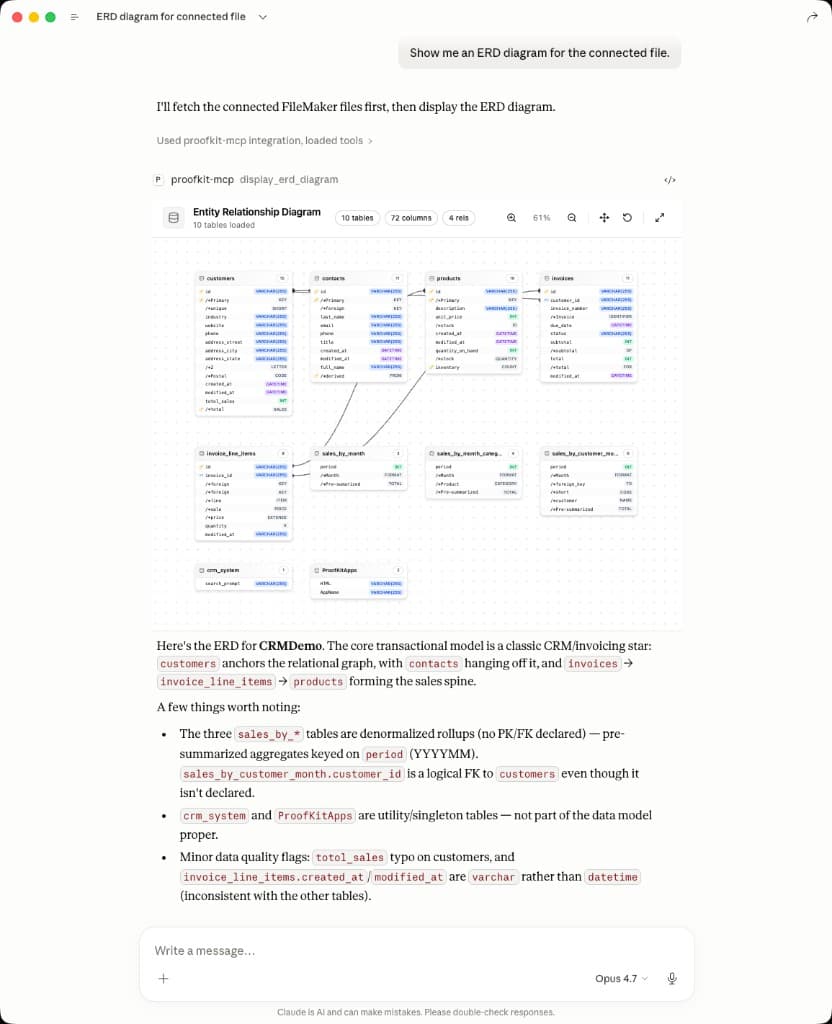
Claude Desktop can use ProofKit to inspect a connected FileMaker file, render an ERD diagram, and summarize the relationships it finds.
What the agent can learn
- Layout and field names.
- Table occurrence and relationship context.
- Script names and the likely workflows they support.
- Data shapes the future Web Viewer app can use.
Keep exploration grounded
Ask the agent to cite the FileMaker layouts and fields it is using. That keeps ideas tied to real schema instead of generic app suggestions.
Exploration is not schema editing
ProofKit v2 helps agents understand your FileMaker file and build Web Viewer apps. It does not agentically edit tables, fields, layouts, scripts, or value lists in this release.
Next step
When you know the screen you want to build, continue to Build a Web Viewer App.