

FileMaker Scripts as Backend
Use FileMaker scripts for secure business logic behind Web Viewer apps.
FileMaker scripts are the backend for many hybrid app workflows. The Web Viewer handles the interface, while scripts perform privileged work inside FileMaker.
When to use a script
Use a custom FileMaker script when the operation needs:
- Business rules that already live in FileMaker.
- Validation before creating, updating, or deleting records.
- Transaction-style workflows.
- External API calls with secrets that should not be in browser code.
- File system access.
- Printing, PDF generation, or container handling.
Request and response pattern
Keep the bridge contract simple: send JSON in, return JSON out.
{
  "action": "approveInvoice",
  "invoiceId": "123",
  "notes": "Approved from Web Viewer"
}{
"ok": true,
"invoiceId": "123",
"status": "Approved"
}If an operation fails, return a structured error the web app can display.
{
  "ok": false,
  "error": {
    "code": "VALIDATION_FAILED",
    "message": "This invoice cannot be approved until it has at least one line item."
  }
}
Script templates included with the add-on
The ProofKit add-on includes two sample scripts that already follow the callback pattern used by fmFetch:
FETCH CALLBACK TEMPLATEFETCH CALLBACK TEMPLATE (Server version)
Copy one of these scripts when you need a FileMaker-backed endpoint for your Web Viewer. The regular version is for scripts that can safely run in the user's current FileMaker session. The server version is for workflows that should run on FileMaker Server, such as longer-running work or tasks that need a clean server context.
Both templates follow the same structure:
- Read the incoming JSON from
Get ( ScriptParameter ). - Pull out the
callbackvalue that tells FileMaker where to send the response. - Optionally read
datafor the request payload sent from the Web Viewer. - Set
$webViewerNameto the Web Viewer object name that should receive the callback. - Build
$resultas a JSON object. - Call the included
SendCallBackscript with the callback, result, and Web Viewer name.
Replace only the middle "update info here" block with your business logic. Leave the setup and final callback steps in place so the Web Viewer receives the response that fmFetch is waiting for.
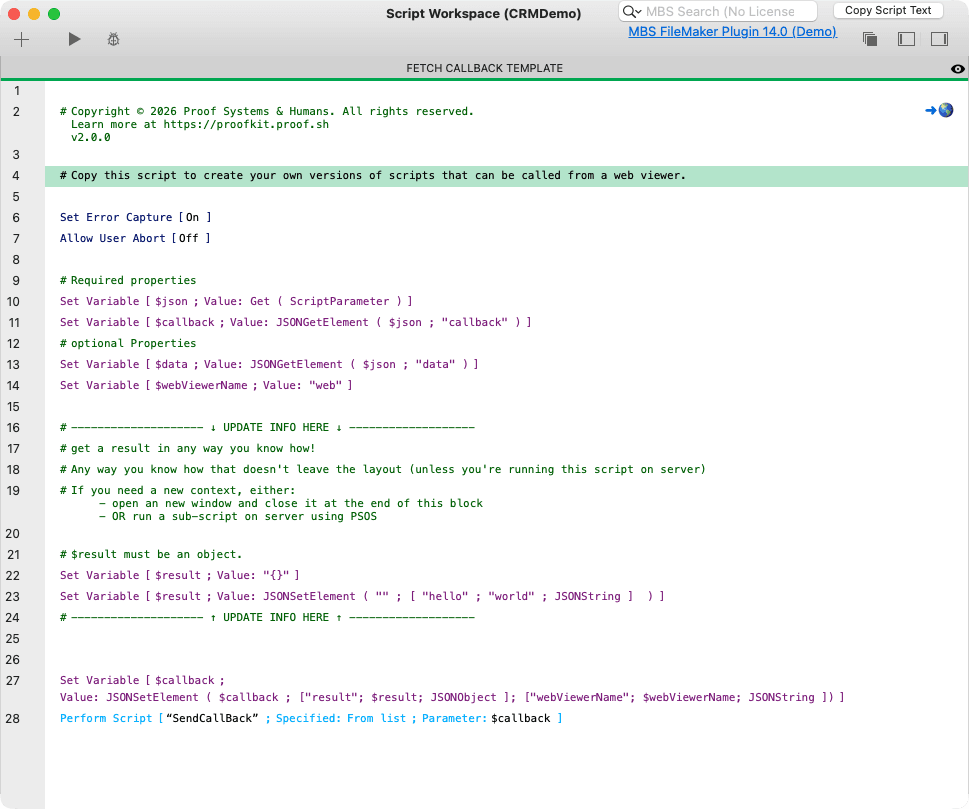
The add-on's FETCH CALLBACK TEMPLATE shows the required pattern: read the request JSON, build a result object, and send that result back to the Web Viewer callback.
Why scripts are powerful here
Scripts run inside the FileMaker security and data model. That means the web app can ask FileMaker to do work without moving privileged logic, credentials, or platform-specific behavior into browser JavaScript.