

Data Access
How ProofKit Web Viewer apps read and write FileMaker data.
For hybrid apps, the generated data path uses FileMaker's Execute Data API script step, called through FileMaker scripts from the Web Viewer app.
The basic flow
- The React app needs data for a screen.
- TanStack Query calls a ProofKit data function.
- The Web Viewer bridge calls a FileMaker script.
- The script runs Execute Data API against a layout.
- FileMaker returns JSON to the Web Viewer.
- The UI renders and caches the result.
Custom scripts for reads and writes
Execute Data API is the default generated path, not the only way to read or write FileMaker data. A Web Viewer app can call any FileMaker script that accepts a JSON parameter and returns JSON to the app.
Use a custom script when a screen needs data or behavior that is awkward to express as one layout query or simple generated write, such as:
- Aggregated reporting data.
- Data from multiple layouts or files.
- A response shaped specifically for one workflow.
- Transactions.
- Validation before destructive actions.
- Multi-step workflows.
- Permission-aware behavior that depends on FileMaker session context.
- Results from external APIs, plug-ins, file system access, or other FileMaker-only capabilities.
For the bridge contract, keep the boundary simple: send JSON in and return JSON out. Read FileMaker Scripts as Backend for the higher-level pattern, or fmFetch for the lower-level script call and callback mechanics.
Layouts define the data shape
Execute Data API reads from FileMaker layouts, so the fields available to the web app are the fields available through those layouts.
Good layout design makes better Web Viewer apps:
- Use focused layouts for single entities like companies, contacts, or invoices.
- Use composite layouts when a screen needs one primary record plus related portal data.
- Keep heavy calculated or unstored fields out of broad list queries when possible.
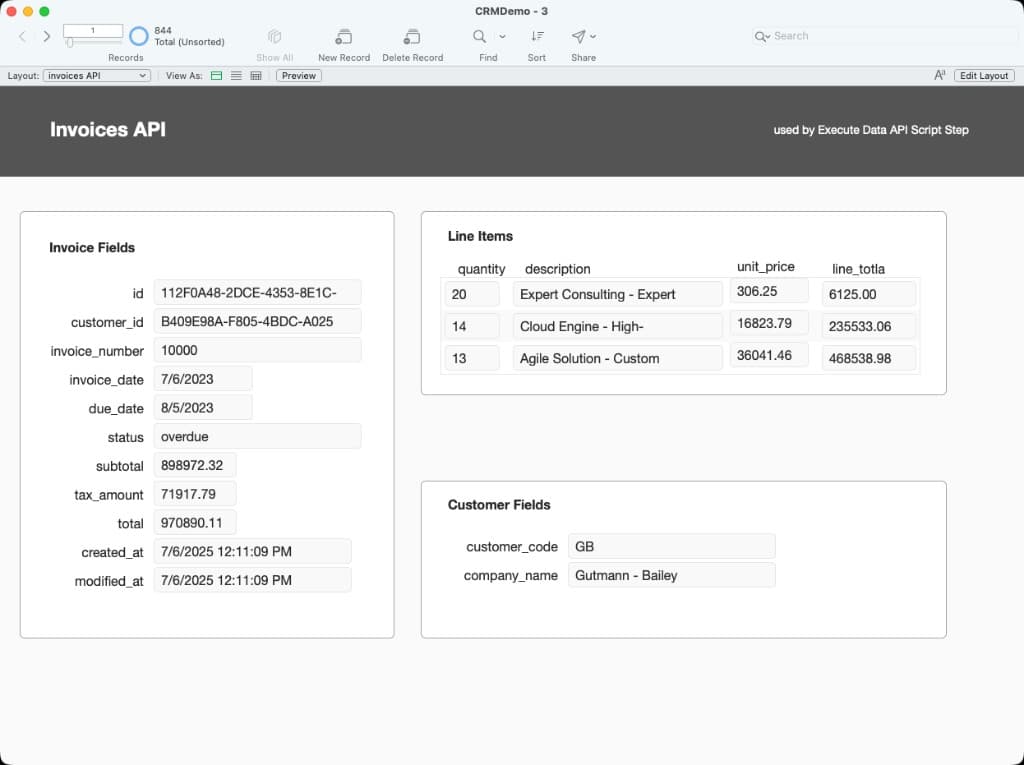
An example layout designed for API access. It uses relationships to fetch an invoice, its related line items, and related customer data in a single request, which is often the most efficient shape for a detail screen.
Type safety
The @proofkit/typegen CLI reads FileMaker metadata and generates TypeScript types and validators. That gives the agent field names, record shapes, and compile-time feedback while it builds the app.
Whenever FileMaker layouts or fields change, make sure you re-run the npx @proofkit/typegen command to keep your types up to date. Learn more.
Full web apps
For full browser apps hosted outside FileMaker, use server-oriented transports such as the FileMaker Data API or OData. See @proofkit/fmdapi and @proofkit/fmodata for package details.